반응형
HP-UX 명령어 정리
목차
하드웨어
조작(Operation)명령어| 하드웨어 확인(CPU, Memory, Firm, OS) | machinfo machinfo | grep -i memory |
| 모델 넘버 확인 | model |
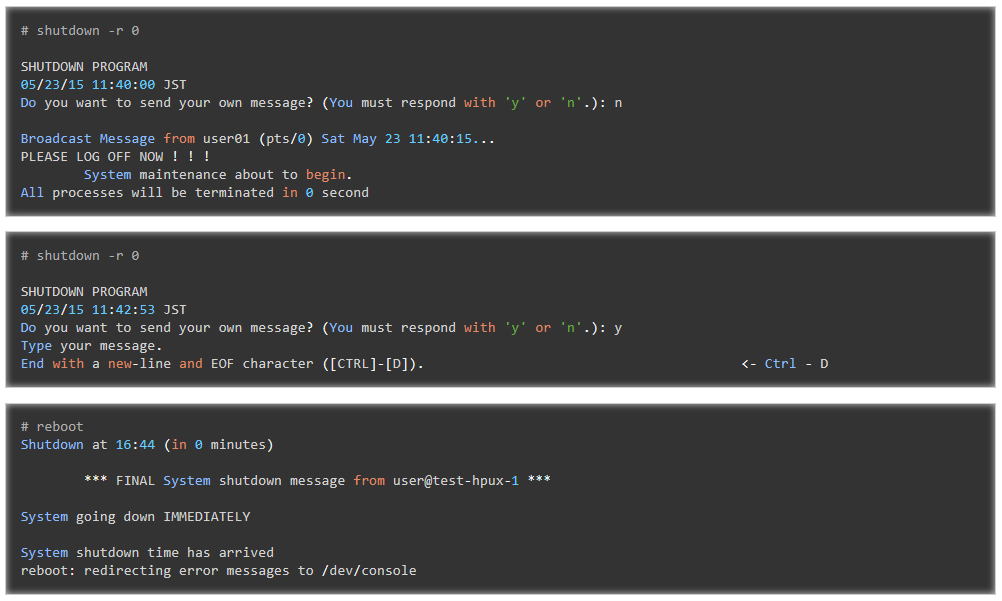
| 재부팅(reboot) | shutdown -r 0 shutdown -r now reboot |
| 중단(halt) | shutdown -h 0 |
OS 정보
조작(Operation)명령어| OS 정보 확인 | osinfo |
| 호스트네임 확인 | hostname grep -i hostname /etc/rc.config.d/netconf |
| 런레벨 확인 | who -r grep initdefault /etc/inittab |
| Release date 확인 | uname -a uname -r |
| 커널 구성 날짜(configuration date) 확인 | kconfig -w |
| 커널 파라미터 확인 | kctune ← all parameter kctune -S ← not default parameter kctune PARAMETER |
| 커널 파라미터 세팅 | kctune PARAMETER=VALUE kctune PARAMETER=Default ← change default kctune -h PARAMETER=VALUE |
| -h = changes will be held until next boot |
네트워크
조작(Operation)명령어| NIC 확인 | nwmgr |
| NIC 확인 | lanscan |
| 모든 NIC의 IP 나열 | netstat -in ← no DNS netstat -i ← use DNS |
| IP 확인 | ifconfig NICNAME ifconfig lan0 |
| 라우팅 확인 | netstat -rm |
| NIC 속도 확인 | lanadmin -x PPANUMBER lanadmin -x 0 |
| NIC Down 확인 | ifconfig NICNAME down |
| NIC Up 확인 | ifconfig NICNAME up |
유저
조작(Operation)명령어| 시스템에 새로운 그룹 추가 | groupadd -g GID GROUP groupadd -g 1000 dev |
| 시스템에 새 사용자 로그인 추가 | useradd -m USER |
| -m = Creates the home directory for the new login if it does not exist. | |
| 시스템으로부터 사용자 로그인 삭제 | userdel USER userdel -r USER ← delete home directory |
| 로그인 패스워드 변경 | passwd passwd USER |
| 패스워드 만료일 설정 | passwd -x 90 USER ← 90 days |
| 잠금된(Locked) 사용자 확인 | userstat -u USER |
| 사용자 잠금 해제 | userdbset -d -u USER auth_failures |
| 패스워드 규칙 설정 | /usr/sbin/userdbset -u USER MIN_PASSWORD_LENGTH=8 PASSWORD_HISTORY_DEPTH=1 AUTH_MAXTRIES=10 PASSWORD_MIN_LOWER_CASE_CHARS=1 PASSWORD_MIN_UPPER_CASE_CHARS=1 PASSWORD_MIN_DIGIT_CHARS=1 PASSWORD_MIN_SPECIAL_CHARS=0 |
| 시스템에서 사용자 로그인 수정 | usermod -u UID -g PRIMARY_GROUP -G GROUP USER |
디스크
조작(Operation)명령어| Utilization ratio | bdf |
| 디스크 사용량 요약 | du -sk DIRECTORY |
| 마운트 확인 | mount mount -v |
| 볼륨 마운트 | mount -F vxfs /dev/vg01/lvol1 /u02 |
| 볼류 언마운트 | umount /u02 |
| 마운트 프로세스 확인 | fuser -u /u02 pvdisplay /dev/disk/disk3_p2 |
| 볼륨 그룹 나열(list) | vgdisplay vgdisplay -v vgdisplay -v vg01 | grep "PV Name" |
| 볼륨 그룹 활성화/비활성화 | vgchange -a n /dev/vg01 ← deactivate vgchange -a y /dev/vg01 ← activate |
| 논리 볼륨 나열(list) | lvdisplay /dev/vg01/lvol02 |
스토리지
조작(Operation)명령어| 스토리지 LUN 확인 | ioscan -N -fnu -C disk ioscan -fnkC disk ioscan -m lun |
| HP XP 스토리지 확인 | xpinfo -i ← reduction xpinfo ← detail xpinfo -v ← check xpinfo version |
| 스토리지 스캔 | ioscan ioscan -f ← detail |
소프트웨어
조작(Operation)명령어| 소프트웨어 나열(list) | swlist |
| HP-UX 버전 | swlist | grep HPUX11i |
| HP-UX pach 버전 | swlist -l bundle QPKBASE swlist -l bundle | grep QPK |
| 소프트웨어 설치 | swinstall -s ./SOURCE.depot swinstall -s ./SOURCE.depot SOFTWARE |
| installed /usr/local | |
| 소프트웨어 제거 | swremove ← GUI swremove SOFTWARE ← CLI |
Operation
조작(Operation)명령어| ls | ls -l |
| sudo | visudo |
| 현재 성능 정보 | top glance |
| 메모리 정보 | swapinfo |
| 부하 평균 | w |
| 현재 로그인 정보 | w |
| 이전 로그인 정보 | last |
서비스
조작(Operation)명령어| 서비스 중지 | /sbin/init.d/SERVICE top |
| 서비스 시작 | /sbin/init.d/SERVICE start |
* 원문: HP-UX Commands Cheat Sheet [cmdref.net - Cheat Sheet and Example]
HP-UX Commands Cheat Sheet
Table of Contents
Reference
-
HPUX 10.20 - man pages http://ods.com.ua/win/eng/unix/usail/man/hpux/
Hardware
OperationCommandsupplement
| Check Hardware (CPU, Memory, Firm, OS) |
machinfo machinfo |grep -i memory |
|
| Check model number | model | Example: superdome, Integrity rx2800 |
| reboot | shutdown -r 0 shutdown -r now reboot |
|
| halt | shutdown -h 0 |
OS Information
OperationCommandsupplement
| Check OS Information | osinfo | Host, Version, LastBootTime, SystemUpTime |
| Check hostname | hostname grep -i hostname /etc/rc.config.d/netconf |
|
| Check runlevel | who -r grep initdefault /etc/inittab |
|
| Check release date | uname -a uname -r |
|
| Check kernel configuration date | kconfig -w | |
| Check kernel parameter | kctune ← all parameter kctune -S ← not default parameter kctune PARAMETER |
|
| Setting kernel parameter | kctune PARAMETER=VALUE kctune PARAMETER= ← Change Default kctune PARAMETER=Default ← Change Default kctune -h PARAMETER=VALUE -h : Changes will be held until next boot Example kctune filecache_max=4% kctune semmns=“(semmni*2)” |
|
| dmesg |
Network
-
/etc/rc.config.d/netconf
OperationCommandsupplement
| Check NIC | nwmgr | Is the NIC Down or Up? |
| Check NIC | lanscan | Is the NIC Down or Up? |
| List All NIC's IP | netstat -in ← no DNS netstat -i ← Use DNS |
|
| Check IP | ifconfig NICNAME ifconfig lan0 |
|
| Check routing | netstat -rn | |
| Check NIC Speed | lanadmin -x PPANUMBER lanadmin -x 0 |
|
| Change NIC Down | ifconfig NICNAME down | |
| Change NIC Up | ifconfig NICNAME up |
User
OperationCommandsupplement
| add a new group to the system | groupadd -g GID GROUP groupadd -g 1000 dev |
|
| add a new user login to the system | useradd -m USER useradd -g PRIMARY_GROUP -G GROUP -u UID -s /usr/local/bin/bash -m USER -m : Create the home directory for the new login if it does not exist. |
|
| delete a user login from the system | userdel USER userdel -r USER ← delete home directory |
|
| change login password | passwd passwd USER |
|
| password expires's day | passwd -x 90 USER ← 90days | |
| Check Locked User? | userstat -u USER | |
| unlock user | userdbset -d -u USER auth_failures | |
| password rule | /usr/sbin/userdbget -u USER ← check /usr/sbin/userdbset -u USER MIN_PASSWORD_LENGTH=8 PASSWORD_HISTORY_DEPTH=1 AUTH_MAXTRIES=10 PASSWORD_MIN_LOWER_CASE_CHARS=1 PASSWORD_MIN_UPPER_CASE_CHARS=1 PASSWORD_MIN_DIGIT_CHARS=1 PASSWORD_MIN_SPECIAL_CHARS=0 |
|
| modify a user login on the system | usermod -u UID -g PRIMARY_GROUP -G GROUP USER | |
Disk
OperationCommandsupplement
| utilization ratio | bdf | |
| summarize disk usage | du -sk DIRECTORY | |
| check mount | mount mount -v |
|
| mount volume | mount -F vxfs -o largefiles,log,nodatainlog /dev/vg01/lvol1 /u02 largefiles : using over 2GB file. |
|
| umount volume | umount /u02 | |
| check mount process | fuser -u /u02 | |
| pvdisplay /dev/disk/disk3_p2 | ||
| list vg (volume group) | vgdisplay vgdisplay -v vgdisplay -v vg00 |grep "PV Name" |
check activated or not |
| VG activate / deactivate | vghcnage -a n /dev/vgxxx ← deactivate vgchange -a y /dev/vgxxx ← activate |
|
| list lv (logical volume) | lvdisplay /dev/vg*/lvol* | |
Associated Site
Storage
OperationCommandsupplement
| Check LUN of Storage | ioscan -N -fnu -C disk ioscan -fnkC disk ioscan -m dsf ioscan -m lun |
|
| Check HP XP Storage | xpinfo -i ← reduction xpinfo ← detail xpinfo -v ← check xpinfo version |
|
| Scan Storage | ioscan ioscan -f ← Detail |
Software
OperationCommandsupplement
| Listing Software | swlist | |
| HP-UX Version | swlist |grep HPUX11i | |
| HP-UX pach version | swlist -l bundle QPKBASE swlist -l bundle | grep QPK |
|
| Installing Software | swinstall -s ./SOURCE.depot swinstall -s ./SOURCE.depot SOFTWARE swinstall -s ./SOURCE.depot "*" |
Installed /usr/local You need correct hosts and DNS. |
| Removing Software | swremove ← GUI swremove SOFTWARE ← CUI |
|
| show_patches |
Operation
OperationCommandsupplement
| ls | ls -l ← Byte Unit | |
| sudo | visudo | |
| Performance Information right now | top | |
| Performance Information right now | glance | |
| Memory Information | swapinfo | |
| Load Average | w | |
| login information right now | w | |
| login information backward | last |
Service
OperationCommandsupplement
| stop service | /sbin/init.d/SERVICE stop | secsh ← ssh net ← network |
| start service | /sbin/init.d/SERVICE start |
restart

Note
OperationCommandsupplement
| Japanese LANG | export LANG=ja_JP.SJIS |
ICAP
OperationCommandsupplement
| icapstatus | ||
| parstatus |
Replacement for Linux Command
Linux OperationHP-UX Commandsupplement
| find --maxdepth=1 | cd /etc ; find . -name "hosts" -type f ! -path '.*/*/*' | |
| compress tar z option | tar -cvf - test.d | gzip > /tmp/test.tar.gz tar -cvf - /etc/test.d | gzip > /tmp/test.tar.gz |
|
| uncompress tar z option | gzip -dc test.tar.gz | tar xvf - bzip2 -dc test.tar.bz2 | tar xvf - |
HP-UX Commands Cheat Sheet [cmdref.net - Cheat Sheet and Example]
반응형